Most agent tutorials explain one piece at a time:
- LangChain or LangGraph for building an agent.
- MCP for connecting tools.
- A2A for letting agents talk to other agents.
That is useful, but it leaves a gap. In real projects these pieces usually meet each other. You do not just build "an MCP thing" or "an A2A thing". You build an agent loop, attach tools to it, and sometimes delegate work to another agent that has its own loop and its own tools.
This post builds that full mental model from the ground up. We will start with a single calculator tool, move that tool behind an MCP server, wrap the agent behind an A2A endpoint, and then build an orchestrator that combines:
- a LangChain agent backed by LangGraph,
- tools discovered from MCP servers,
- specialist agents reached over A2A.
Before You Start#
This post focuses on how LangChain/LangGraph, MCP, and A2A fit together in one practical agent system. If you want to go deeper on one of the individual pieces first, read through my previous blog posts:
- To learn how to create your own AI agent from scratch using LangGraph, read Building Your First Cybersecurity AI Agent with LangGraph.
- To understand MCP architecture in depth, including its security risks, read Offensive MCP and MCP for Offensive.
All code samples used in this post are available in the companion GitHub repository: github.com/RyvaneAI/a2a-mcp-langgraph-demo.
What We Are Building#
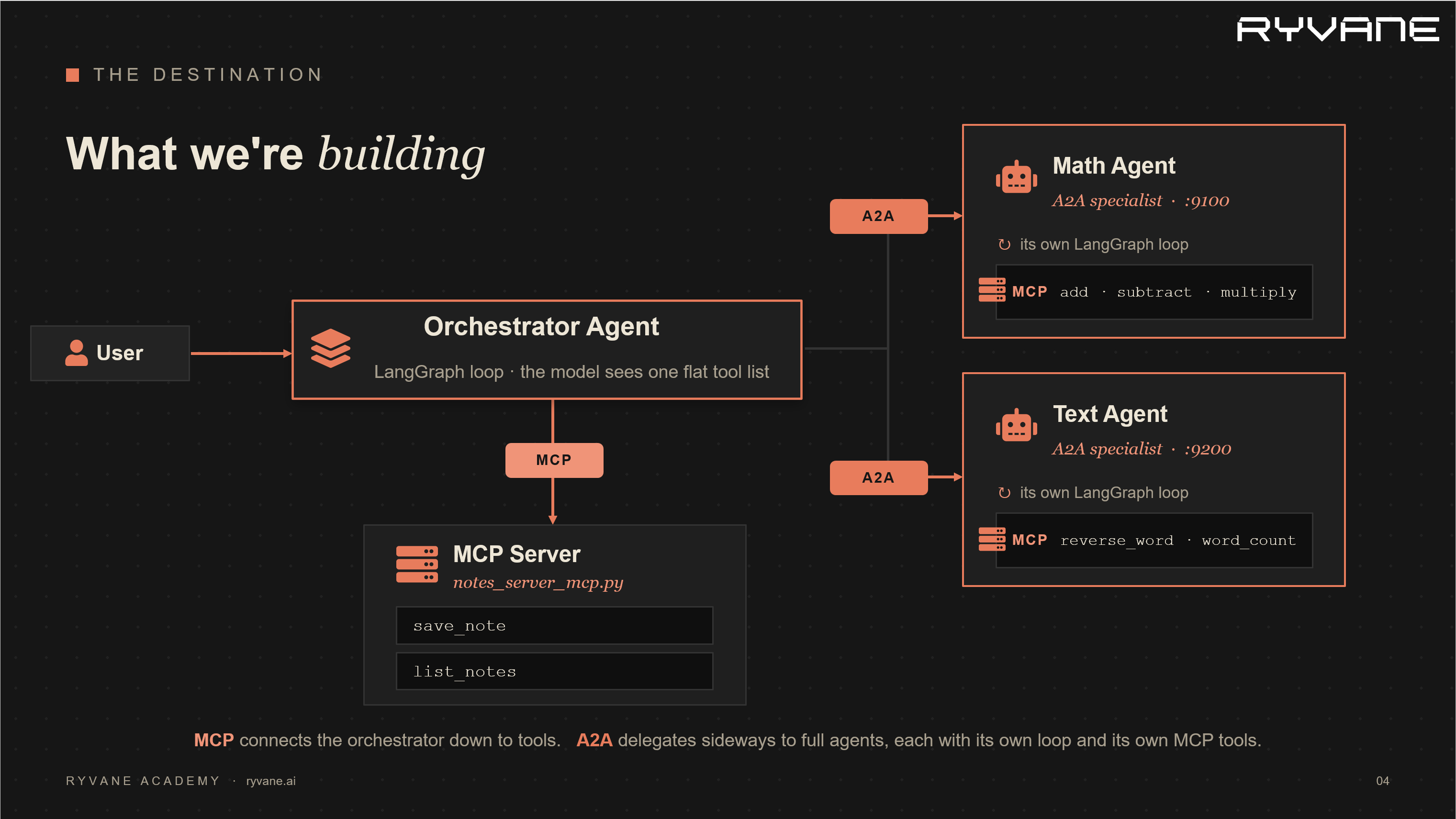
By the end, the system we are going to build will look something like this:

There are three layers:
- LangChain/LangGraph runs the agent loop: model thinks, model calls a tool, tool result comes back, model thinks again.
- MCP exposes tools from a separate process, so the agent does not need tool implementations hardcoded inside its own file.
- A2A exposes a whole agent over a network boundary, so another agent can delegate a task without importing its code or knowing its internal tools.
One sentence to keep in mind:
MCP connects an agent downward to tools. A2A connects an agent sideways to another agent. LangGraph is the reasoning loop in the middle.
Project Setup#
Create a folder and install the dependencies:
mkdir agent-mcp-a2a-guide
cd agent-mcp-a2a-guide
python -m venv .venv
# Windows PowerShell
.\.venv\Scripts\Activate.ps1
# macOS/Linux
# source .venv/bin/activate
pip install -r requirements.txtThe requirements.txt used by this project is:
python-dotenv
langchain>=1.2
langgraph>=1.0
langchain-openai>=1.1
langchain-mcp-adapters>=0.2
mcp[cli]>=1.27
a2a-sdk>=1.0
httpx
uvicorn
starlette
typing-extensionsCreate a .env file:
DEEPSEEK_API_KEY="your-deepseek-api-key"This tutorial is model agnostic. I am using DeepSeek because that is what I have configured locally, but the architecture does not depend on DeepSeek. You can use OpenAI, Anthropic, Gemini, OpenRouter, or any other model provider supported by LangChain. The only part that changes is the model initialization and the environment variable that stores your API key.
DeepSeek exposes an OpenAI-compatible API, so we can use LangChain's ChatOpenAI class with DeepSeek's base_url:
from langchain_openai import ChatOpenAI
model = ChatOpenAI(
model="deepseek-chat",
api_key=os.getenv("DEEPSEEK_API_KEY"),
base_url="https://api.deepseek.com/v1",
temperature=0.7,
)Run all commands from the same directory as the Python files. The MCP stdio examples launch local scripts with relative paths such as args=["math_server_mcp.py"].
Part 1: What Is an Agent?#
A plain LLM call is one shot:
response = model.invoke("What is 15 times 23?")The model returns text. It might answer correctly, but it did not truly do anything outside the model. It predicted a likely answer.
An agent is different because it can take actions. The minimal agent loop is:
ask the model -> maybe call a tool -> give the result back -> ask the model againThat loop continues until the model stops asking for tools and returns a final answer.

Three terms matter:
- Tool: a callable capability the model is allowed to request.
- Tool call: the structured request emitted by the model, such as
multiply({"a": 15, "b": 23}). - Agent loop: the repeated model/tool/model/tool process.
LangGraph is the graph runtime that makes this loop explicit and reliable. In LangChain v1, the standard langchain.agents.create_agent function builds a LangGraph-backed agent for you.
A Minimal LangChain Agent#
File: demo_agent0.py
import os
import asyncio
from dotenv import load_dotenv
from langchain_core.tools import tool
from langchain_openai import ChatOpenAI
from langchain.agents import create_agent
load_dotenv()
@tool
def multiply(a: int, b: int) -> int:
"""Multiply two numbers."""
return a * b
model = ChatOpenAI(
model="deepseek-chat",
api_key=os.getenv("DEEPSEEK_API_KEY"),
base_url="https://api.deepseek.com/v1",
temperature=0.7,
)
async def main():
agent = create_agent(model=model, tools=[multiply]) # add debug=True if you want to see what's happening
result = await agent.ainvoke(
{"messages": [{"role": "user", "content": "What is 15 times 23?"}]}
)
print(result["messages"][-1].content)
if __name__ == "__main__":
asyncio.run(main())Run it:
python demo_agent0.py
What happens internally:
- The user asks, "What is 15 times 23?"
- The model decides it should use
multiply. - LangChain executes the tool call
multiply(a=15, b=23). - The tool returns
345. - The tool result is appended to the message history.
- The model sees the result and writes the final answer.
The important point is not the math. The important point is control flow: the model did not directly calculate in your Python process. It requested a tool call, your runtime executed the tool, and then the model continued with the result.
That is the basic agent pattern.
Why create_agent Instead of create_react_agent?#
Older tutorials often show:
from langgraph.prebuilt import create_react_agentThat still exists in some LangGraph contexts, but in LangChain v1 the recommended high-level path is:
from langchain.agents import create_agentcreate_agent creates an agent graph that calls tools in a loop until a stopping condition is reached. You still get LangGraph under the hood, but you use the current LangChain API surface.
Part 2: MCP, Moving Tools Out of the Agent#
Inline tools are fine for a first demo. They become painful in real systems.
Imagine five agents all need a customer lookup tool. If that tool is copied into every agent:
- bug fixes must be copied everywhere,
- credentials are spread across multiple services,
- tool behavior can drift across agents,
- every agent process needs the same dependencies.
MCP solves this by moving tools into a separate server process.

MCP vocabulary:
- MCP server: the process that exposes tools, resources, or prompts.
- MCP client: the application that connects to the server.
- Transport: how they communicate.
stdio: the client launches the server as a subprocess and talks over standard input/output.streamable-http: the server runs as an HTTP service.
In our examples, the agent is the MCP client.
MCP Server Over stdio#
File: math_server_mcp.py
"""An MCP server. Run it and it offers tools over stdio."""
from mcp.server.fastmcp import FastMCP
mcp = FastMCP("Math MCP")
@mcp.tool()
def add(a: int, b: int) -> int:
"""Add two numbers."""
return a + b
@mcp.tool()
def multiply(a: int, b: int) -> int:
"""Multiply two numbers."""
return a * b
@mcp.tool()
def subtract(a: int, b: int) -> int:
"""Subtract two numbers."""
return a - b
if __name__ == "__main__":
mcp.run(transport="stdio")This file has no LLM and no agent. It only exposes tools.
That separation is the reason MCP is useful. A database team, platform team, or product team can own an MCP server. Agent developers can connect to it without copying implementation details.
LangChain Agent Using MCP Tools#
File: demo_agent_mcp.py
import asyncio
import os
from dotenv import load_dotenv
from langchain_openai import ChatOpenAI
from langchain_mcp_adapters.client import MultiServerMCPClient
from langchain.agents import create_agent
load_dotenv()
model = ChatOpenAI(
model="deepseek-chat",
api_key=os.getenv("DEEPSEEK_API_KEY"),
base_url="https://api.deepseek.com/v1",
temperature=0.7,
)
async def main():
client = MultiServerMCPClient(
{
"math": {
"command": "python",
"args": ["math_server_mcp.py"],
"transport": "stdio",
}
}
)
tools = await client.get_tools()
print("Tools discovered from MCP server:", [t.name for t in tools])
agent = create_agent(model=model, tools=tools)
result = await agent.ainvoke(
{"messages": [{"role": "user", "content": "what is (3 + 5) * 12?"}]}
)
print(result["messages"][-1].content)
if __name__ == "__main__":
asyncio.run(main())Run it:
python demo_agent_mcp.py
The key bridge is this line:
tools = await client.get_tools()MultiServerMCPClient connects to the MCP server, asks what tools it exposes, and returns LangChain-compatible tool objects. From that point on, the agent does not care that the tools came from MCP. It just sees tools.
That is the design win:
inline function tool -> MCP-discovered toolThe agent loop stays the same.
MCP Over HTTP#
stdio is great for local development and local desktop tools. HTTP is better when the MCP server is remote, shared, containerized, or deployed separately.
File: math_server_http.py
"""An MCP server. Run it and it offers tools over HTTP."""
from mcp.server.fastmcp import FastMCP
mcp = FastMCP("Math MCP")
@mcp.tool()
def add(a: int, b: int) -> int:
"""Add two numbers."""
return a + b
@mcp.tool()
def multiply(a: int, b: int) -> int:
"""Multiply two numbers."""
return a * b
@mcp.tool()
def subtract(a: int, b: int) -> int:
"""Subtract two numbers."""
return a - b
@mcp.tool()
def divide(a: int, b: int) -> float:
"""Divide two numbers."""
if b == 0:
raise ValueError("Cannot divide by zero")
return a / b
if __name__ == "__main__":
mcp.run(transport="streamable-http")Run the HTTP MCP server in one terminal:
python math_server_http.py
Then connect from another terminal.
File: demo_agent_mcp_http.py
client = MultiServerMCPClient(
{
"math": {
"url": "http://localhost:8000/mcp",
"transport": "streamable_http",
"headers": {},
}
}
)Notice the transport naming:
- MCP server uses
transport="streamable-http"with a hyphen. langchain-mcp-adaptersclient config uses"streamable_http"with an underscore.
That is not a typo. Those are the names expected by the installed libraries.
Run:
python demo_agent_mcp_http.py
You can also see the logs of math_server_http.py showing that multiple tool-list and tool-call requests are being made.

At this point you have an agent loop whose tools are no longer hardcoded in the agent process.
Part 3: A2A, Letting Agents Talk to Agents#
MCP exposes tools. Tools do not reason. They take inputs and return outputs. For instance, when you call add(3, 5), it always returns 8. There is no reasoning in it.
Sometimes the thing you want to delegate to is itself an agent.
A2A exposes agents. Agents can have their own LLM, their own tools, their own policies, their own memory, and their own deployment boundary.
Use A2A when the thing you want to call is not just a function. For example:
- Your agent needs a legal summary; a different team runs a "legal agent" with access to documents you are not allowed to touch.
- Your agent needs deep research done; there is a specialist research agent that takes minutes and uses dozens of its own tools.
- A finance agent with access to private financial systems.
- A code review agent that has its own repository tools.
The calling agent should not import the specialist's code. It should discover what the specialist can do, send a message, and receive a result.
A2A (Agent-to-Agent protocol) is the open standard for that. One agent calls another over HTTP, without knowing anything about how the other one works inside. Comparing the two protocols directly, this is the key mental model of the whole guide:

MCP connects an agent down to tools. A2A connects an agent across to another agent. Tools do not reason; agents do. That is the whole distinction.
The one new concept in A2A: The Agent Card#
For your agent to call another agent, it first has to find out what that agent can do. A2A's answer is the Agent Card: a small JSON document every A2A agent publishes at a well-known URL (/.well-known/agent-card.json). It states the agent's name, what skills it has, its address, and how to authenticate. It is the equivalent of a menu. You read it before you order.
The Agent Card includes:
- agent name,
- description,
- version,
- supported protocol endpoint,
- input and output modes,
- capabilities,
- skills.
So an A2A interaction is always: fetch the card (discovery), then send a message, then get a result back. The SDK gives you helpers for each step. You rarely touch raw JSON.
The well-known card URL in this example is:
http://localhost:9100/.well-known/agent-card.jsonIn a2a-sdk 1.0.3, the card uses supported_interfaces, not the older top-level url field:
AgentCard(
name="Math Agent",
description="Solves arithmetic word problems.",
version="0.1.0",
supported_interfaces=[
AgentInterface(
url="http://localhost:9100/",
protocol_binding=TransportProtocol.JSONRPC,
)
],
...
)Turning the Math Agent Into an A2A Server#
We will take the LangGraph + MCP math agent from Part 2 and put an A2A "front door" on it so other agents can call it. The agent inside is unchanged. We are only adding a way to reach it.
The A2A SDK's model: you implement a class with an execute method (it receives the incoming message and sends back a reply), describe your agent in an Agent Card, and the SDK runs the web server. The math specialist will be:
A2A server outside
-> LangChain/LangGraph agent inside
-> MCP math tools underneathFile: math_agent_a2a.py
"""
The Part 2 agent (LangGraph + MCP), now reachable over A2A on port 9100.
Other agents will see ONLY the A2A door, not LangGraph, not MCP.
Targets a2a-sdk 1.0.3.
"""
import asyncio
import os
from dotenv import load_dotenv
from langchain_openai import ChatOpenAI
import uvicorn
from typing_extensions import override
from langchain_mcp_adapters.client import MultiServerMCPClient
from langchain.agents import create_agent
from starlette.applications import Starlette
from a2a.server.agent_execution import AgentExecutor, RequestContext
from a2a.server.events import EventQueue
from a2a.server.request_handlers import DefaultRequestHandler
from a2a.server.routes import create_jsonrpc_routes, create_agent_card_routes
from a2a.server.tasks import InMemoryTaskStore
from a2a.types import AgentCapabilities, AgentCard, AgentSkill, AgentInterface
from a2a.utils import TransportProtocol
from a2a.helpers import new_text_message
load_dotenv()
model = ChatOpenAI(
model="deepseek-chat",
api_key=os.getenv("DEEPSEEK_API_KEY"),
base_url="https://api.deepseek.com/v1",
temperature=0.7,
)
class MathAgentExecutor(AgentExecutor):
def __init__(self, graph):
self.graph = graph
@override
async def execute(self, context: RequestContext, event_queue: EventQueue) -> None:
user_text = context.get_user_input()
result = await self.graph.ainvoke(
{"messages": [{"role": "user", "content": user_text}]}
)
answer = result["messages"][-1].content
await event_queue.enqueue_event(new_text_message(answer))
@override
async def cancel(self, context, event_queue):
raise NotImplementedError
def build_card() -> AgentCard:
return AgentCard(
name="Math Agent",
description="Solves arithmetic word problems.",
version="0.1.0",
supported_interfaces=[AgentInterface(
url="http://localhost:9100/",
protocol_binding=TransportProtocol.JSONRPC,
)],
default_input_modes=["text"],
default_output_modes=["text"],
capabilities=AgentCapabilities(streaming=False),
skills=[AgentSkill(
id="solve_math",
name="Solve Math Problem",
description="Send a plain-English arithmetic question.",
tags=["math"],
examples=["what is (3 + 5) * 12?"],
)],
)
async def main():
client = MultiServerMCPClient({
"math": {"command": "python", "args": ["math_server_mcp.py"],
"transport": "stdio"}
})
tools = await client.get_tools()
graph = create_agent(model=model, tools=tools)
card = build_card()
handler = DefaultRequestHandler(
agent_executor=MathAgentExecutor(graph),
task_store=InMemoryTaskStore(),
agent_card=card,
)
routes = create_agent_card_routes(agent_card=card)
routes += create_jsonrpc_routes(
request_handler=handler,
rpc_url="/",
enable_v0_3_compat=True,
)
app = Starlette(routes=routes)
config = uvicorn.Config(app, host="0.0.0.0", port=9100, log_level="info")
print("Math Agent reachable at http://localhost:9100")
print("Agent card at http://localhost:9100/.well-known/agent-card.json")
await uvicorn.Server(config).serve()
if __name__ == "__main__":
asyncio.run(main())Run it:
python math_agent_a2a.py
It is now a running web service. The important takeaway: the LangGraph and MCP parts did not change at all. We only added a door. The world outside sees an "agent that does math," with no idea what is behind it.
Open this URL in a browser or use curl to see the JSON response:
http://localhost:9100/.well-known/agent-card.json
You should see the public description of the agent. The outside world sees only that A2A interface. It does not need to know that inside this service there is a LangChain agent using MCP math tools.
Calling the A2A Agent From Another Agent#
Now the other side. We build a second, separate agent whose job is to solve word problems, and its way of doing arithmetic is to ask the Math Agent over A2A.
The trick that makes this clean: we wrap the entire A2A call (fetch card, send message, read reply) inside a normal @tool function. To the second agent's model, "ask the math agent" looks exactly like any other tool. It does not know it is talking to a whole other agent across the network.
fetch Agent Card -> create A2A client -> send message -> collect answerFile: world_problem_agent.py
import asyncio
import os
from uuid import uuid4
import httpx
from dotenv import load_dotenv
from langchain_openai import ChatOpenAI
from langchain_core.tools import tool
from langchain.agents import create_agent
from a2a.client import A2ACardResolver, ClientConfig, ClientFactory
from a2a.types import Message, Part, Role, SendMessageRequest
from a2a.helpers import get_message_text
load_dotenv()
MATH_AGENT_URL = "http://localhost:9100"
model = ChatOpenAI(
model="deepseek-chat",
api_key=os.getenv("DEEPSEEK_API_KEY"),
base_url="https://api.deepseek.com/v1",
temperature=0.7,
)
async def _call_math_agent(question: str) -> str:
"""The three A2A steps: discover, send, read reply."""
async with httpx.AsyncClient(timeout=60.0) as http:
resolver = A2ACardResolver(httpx_client=http, base_url=MATH_AGENT_URL)
card = await resolver.get_agent_card()
client = ClientFactory(ClientConfig(httpx_client=http)).create(card)
request = SendMessageRequest(
message=Message(
message_id=str(uuid4()),
role=Role.ROLE_USER,
parts=[Part(text=question)],
)
)
chunks = []
async for event in client.send_message(request):
kind = event.WhichOneof("payload")
if kind == "message":
chunks.append(get_message_text(event.message))
elif kind == "task":
for m in event.task.history:
if m.role == Role.ROLE_AGENT:
chunks.append(get_message_text(m))
return "\n".join(chunks).strip()
@tool
async def ask_math_agent(question: str) -> str:
"""
Ask the specialist math agent to do a calculation.
Input: a plain-English arithmetic question. Use this for any math.
"""
return await _call_math_agent(question)
async def main():
agent = create_agent(model=model, tools=[ask_math_agent])
question = ("I have 7 boxes with 6 apples each, and I eat 5 apples. "
"How many are left?")
result = await agent.ainvoke({"messages": [{"role": "user", "content": question}]})
for m in result["messages"]:
m.pretty_print()
if __name__ == "__main__":
asyncio.run(main())Run it in two terminals:
# Terminal 1
python math_agent_a2a.py
# Terminal 2
python world_problem_agent.py
What happens, step by step:
- The word-problem agent's model reads "7 boxes, 6 apples, eat 5."
- It decides it needs arithmetic and calls its tool:
ask_math_agent("(7 * 6) - 5"). - That tool makes an A2A call to the Math Agent on port
9100. - The Math Agent receives it, runs its own LangGraph loop, which calls MCP tools
multiplythensubtract, and returns37. 37comes back as the tool result to the first agent, which answers the user: "You have 37 apples left."
world_problem_agent
-> tool call: ask_math_agent(...)
-> A2A request to math_agent_a2a on port 9100
-> math agent invokes its LangChain agent loop
-> math agent calls MCP tools from math_server_mcp.py
<- math agent returns answer
<- ask_math_agent returns tool result
world_problem_agent writes final answerYou now have an agent calling an agent. This is the composition trick: an A2A delegation can be wrapped as a normal LangChain tool. The calling model does not need to know that the tool is actually another full agent behind an HTTP boundary.
Part 4: All Three Together#
You have now seen each piece alone. The realistic shape is an orchestrator: one agent that has some of its own MCP tools and can delegate to several specialist agents over A2A, with the model deciding which to use for each request.
The orchestrator has:
- its own MCP tools from
notes_server.py, - an A2A delegation tool for the Math Agent,
- an A2A delegation tool for the Text Agent.
The model receives one flat tool list. Some tools are local MCP tools. Some tools are wrappers around remote agents. To the model, they are all just tools.

Notes MCP Server#
File: notes_server.py
from mcp.server.fastmcp import FastMCP
mcp = FastMCP("notes")
_NOTES = []
@mcp.tool()
def save_note(text: str) -> str:
"""Save a short note. Returns a confirmation."""
_NOTES.append(text)
return f"Saved. You now have {len(_NOTES)} note(s)."
@mcp.tool()
def list_notes() -> list[str]:
"""Return all saved notes."""
return _NOTES
if __name__ == "__main__":
mcp.run(transport="stdio")This is intentionally simple. It stores notes in memory, so notes disappear when the server process exits. That is fine for a tutorial. In production, the same MCP surface could write to a database.
Text MCP Server#
File: text_server.py
from mcp.server.fastmcp import FastMCP
mcp = FastMCP("text")
@mcp.tool()
def reverse(text: str) -> str:
"""Reverse a string."""
return text[::-1]
@mcp.tool()
def word_count(text: str) -> int:
"""Count the words in a string."""
return len(text.split())
if __name__ == "__main__":
mcp.run(transport="stdio")Text Agent Over A2A#
The text specialist is the same pattern as the math specialist:
A2A server outside
-> LangChain agent inside
-> MCP text tools underneathFile: text_agent_a2a.py
class TextAgentExecutor(AgentExecutor):
def __init__(self, graph):
self.graph = graph
async def execute(self, context: RequestContext, event_queue: EventQueue) -> None:
user_text = context.get_user_input()
result = await self.graph.ainvoke(
{"messages": [{"role": "user", "content": user_text}]}
)
await event_queue.enqueue_event(
new_text_message(result["messages"][-1].content)
)The full file in this project runs on port 9200 and publishes its card at:
http://localhost:9200/.well-known/agent-card.jsonOrchestrator Agent#
File: orchestrator.py
import asyncio
import os
from uuid import uuid4
import httpx
from dotenv import load_dotenv
from langchain.agents import create_agent
from langchain_core.tools import tool
from langchain_mcp_adapters.client import MultiServerMCPClient
from langchain_openai import ChatOpenAI
from a2a.client import A2ACardResolver, ClientConfig, ClientFactory
from a2a.helpers import get_message_text
from a2a.types import Message, Part, Role, SendMessageRequest
load_dotenv()
model = ChatOpenAI(
model="deepseek-chat",
api_key=os.getenv("DEEPSEEK_API_KEY"),
base_url="https://api.deepseek.com/v1",
temperature=0.7,
)
async def _ask_agent(base_url: str, text: str) -> str:
"""Discover an A2A agent, send a text message, and collect its reply."""
async with httpx.AsyncClient(timeout=60.0) as http:
resolver = A2ACardResolver(httpx_client=http, base_url=base_url)
card = await resolver.get_agent_card()
client = ClientFactory(ClientConfig(httpx_client=http)).create(card)
request = SendMessageRequest(
message=Message(
message_id=str(uuid4()),
role=Role.ROLE_USER,
parts=[Part(text=text)],
)
)
chunks = []
async for event in client.send_message(request):
kind = event.WhichOneof("payload")
if kind == "message":
chunks.append(get_message_text(event.message))
elif kind == "task":
for message in event.task.history:
if message.role == Role.ROLE_AGENT:
chunks.append(get_message_text(message))
return "\n".join(chunk for chunk in chunks if chunk).strip()
@tool
async def ask_math_agent(question: str) -> str:
"""Delegate an arithmetic question to the math specialist agent."""
return await _ask_agent("http://localhost:9100", question)
@tool
async def ask_text_agent(instruction: str) -> str:
"""Delegate a text manipulation task to the text specialist agent."""
return await _ask_agent("http://localhost:9200", instruction)
async def main():
client = MultiServerMCPClient(
{
"notes": {
"command": "python",
"args": ["notes_server.py"],
"transport": "stdio",
}
}
)
mcp_tools = await client.get_tools()
tools = mcp_tools + [ask_math_agent, ask_text_agent]
print("Orchestrator tools:", [t.name for t in tools])
agent = create_agent(
model=model,
tools=tools,
system_prompt=(
"You are an orchestrator. Use ask_math_agent for calculations, "
"ask_text_agent for text operations, and the note tools to save "
"or recall information. Do not do specialist work yourself when "
"a specialist tool is available."
),
)
task = (
"Reverse the word 'langgraph', compute 15 * 4, save a note with "
"both answers, then list all notes."
)
result = await agent.ainvoke({"messages": [{"role": "user", "content": task}]})
for message in result["messages"]:
for call in getattr(message, "tool_calls", []) or []:
print(f" -> called {call['name']}({call['args']})")
if getattr(message, "type", "") == "ai" and getattr(message, "content", ""):
print(message.content)
if __name__ == "__main__":
asyncio.run(main())Run the complete system:
# Terminal 1
python math_agent_a2a.py
# Terminal 2
python text_agent_a2a.py
# Terminal 3
python orchestrator.py
The orchestrator's tool list contains:
save_note from notes_server.py over MCP
list_notes from notes_server.py over MCP
ask_math_agent local wrapper that delegates to Math Agent over A2A
ask_text_agent local wrapper that delegates to Text Agent over A2AThe model sees one list. The runtime knows how each tool is implemented.
That separation is powerful:
- You can add another MCP server without rewriting the agent loop.
- You can add another A2A specialist by writing another wrapper tool.
- You can move a specialist to another machine and only change its base URL.
- You can keep sensitive tools behind the specialist that owns them.
How the Protocols Fit Together#
LangChain and LangGraph#
LangChain gives you the high-level agent API:
agent = create_agent(model=model, tools=tools)LangGraph is the execution model underneath. The graph keeps the state, cycles between model and tools, and stops when the model returns a final answer instead of another tool call.
You reach for LangGraph directly when you need custom control flow:
- human approval before a tool runs,
- retries and fallbacks,
- multi-step deterministic workflows,
- durable checkpoints,
- branching graphs.
For this tutorial, create_agent gives enough LangGraph behavior without making us define graph nodes manually.
MCP#
MCP answers this question:
How does my agent discover and call tools that live outside my agent code?
In this project:
client = MultiServerMCPClient({...})
tools = await client.get_tools()
agent = create_agent(model=model, tools=tools)The agent uses MCP tools exactly like local @tool functions.
A2A#
A2A answers this question:
How does my agent delegate work to another agent without importing its code?
In this project:
resolver = A2ACardResolver(httpx_client=http, base_url="http://localhost:9100")
card = await resolver.get_agent_card()
client = ClientFactory(ClientConfig(httpx_client=http)).create(card)Then the caller sends a SendMessageRequest.
The practical trick is wrapping that A2A round trip as a LangChain tool:
@tool
async def ask_math_agent(question: str) -> str:
return await _ask_agent("http://localhost:9100", question)Now the orchestrator can call a remote agent using the same tool-calling mechanism it uses for simple functions.
Watch the walkthrough#
If you would rather see this built end to end than read it, I recorded a companion video that walks through the same project live: the agent loop, the MCP tools, and the A2A delegation, all running.
Fair warning, this is the first thing I have ever recorded, so the production is rough around the edges and I was clearly finding my feet. The code and the concepts are all there though, and I would genuinely value your feedback on both the build and the format.
References#
- LangChain
create_agent: https://reference.langchain.com/python/langchain/agents/factory/create_agent - LangChain MCP docs: https://docs.langchain.com/oss/python/langchain/mcp
- Python
langchain-mcp-adaptersreference: https://reference.langchain.com/python/langchain-mcp-adapters/client - MCP specification: https://modelcontextprotocol.io
- MCP transports: https://modelcontextprotocol.io/specification/2025-03-26/basic/transports
- A2A protocol: https://a2a-protocol.org
- A2A Python SDK docs: https://a2a-protocol.org/dev/sdk/python/
- DeepSeek API docs: https://api-docs.deepseek.com